Read a .thrl File
A .thrl file is gzip-compressed UTF-8 JSON, so reading one takes a decompress and a JSON parse. The Beats come in the order of the storyOrder array, numbered by guide.beatNumbers, and each Beat’s script is in beat.contentJson. Relationships and Arcs change from Beat to Beat, which takes a little more code, and this page has that code too. Every example runs on Python 3.8+ or Node.js 18+ with no extra packages.
Open the file
Section titled “Open the file”Decompress it and parse the JSON. From the shell, that’s one line with jq:
gunzip -c story.thrl | jq '.project.title'The examples on this page expect format version 1.9 or later, because that’s when storyOrder and the guide block arrived. If your software meets an older file, ask the writer to open it in Throughline and save it once: Throughline brings every old file up to the current version when it opens it.
List the Beats in story order
Section titled “List the Beats in story order”Both examples print the project title, then one line per Beat with its Beat number, title, Setting and cast.
#!/usr/bin/env python3"""Print a .thrl file's title and its Beats in story order."""import gzipimport jsonimport sys

def load_thrl(path):    with gzip.open(path, "rt", encoding="utf-8") as f:        doc = json.load(f)    if "storyOrder" not in doc:        sys.exit("This file is older than format 1.9. Open and save it in Throughline first.")    return doc

def main(path):    doc = load_thrl(path)    beats = {b["id"]: b for b in doc["beats"]}    characters = {c["id"]: c["name"] for c in doc["characters"]}    settings = {w["id"]: w["title"] for w in doc["worlds"]}    numbers = doc["guide"]["beatNumbers"]
    print(doc["project"]["title"])    for beat_id in doc["storyOrder"]:        beat = beats[beat_id]        setting = settings.get(beat.get("sleeveId"), "")        cast = [characters.get(c["id"], "?") for c in beat.get("chips", []) if c.get("type") == "character"]        print(f"{numbers[beat_id]}\t{beat['title']}\t{setting}\t{', '.join(cast)}")

if __name__ == "__main__": main(sys.argv[1])import { readFileSync } from 'node:fs';import { gunzipSync } from 'node:zlib';
const doc = JSON.parse(gunzipSync(readFileSync(process.argv[2])).toString('utf8'));if (!doc.storyOrder) throw new Error('This file is older than format 1.9. Open and save it in Throughline first.');
const beats = new Map(doc.beats.map((b) => [b.id, b]));const characters = new Map(doc.characters.map((c) => [c.id, c.name]));const settings = new Map(doc.worlds.map((w) => [w.id, w.title]));
console.log(doc.project.title);for (const id of doc.storyOrder) { const beat = beats.get(id); const setting = settings.get(beat.sleeveId) ?? ''; const cast = (beat.chips ?? []) .filter((c) => c.type === 'character') .map((c) => characters.get(c.id) ?? '?'); console.log([doc.guide.beatNumbers[id], beat.title, setting, cast.join(', ')].join('\t'));}For the demo project that comes with Throughline, both print:
THE BLACK THIEF AND THE KNIGHT OF THE GLEN1 The Queen's Death ROYAL BEDCHAMBER Queen, The King2 Princes Sent to Safety ISLAND TOWER3 Training in Exile ISLAND TOWER - TRAINING HALL Eldest Prince, Middle Prince, Youngest PrinceThe other Python examples on this page import load_thrl from list_beats.py, so keep them in the same folder.
Story order and Beat numbers
Section titled “Story order and Beat numbers”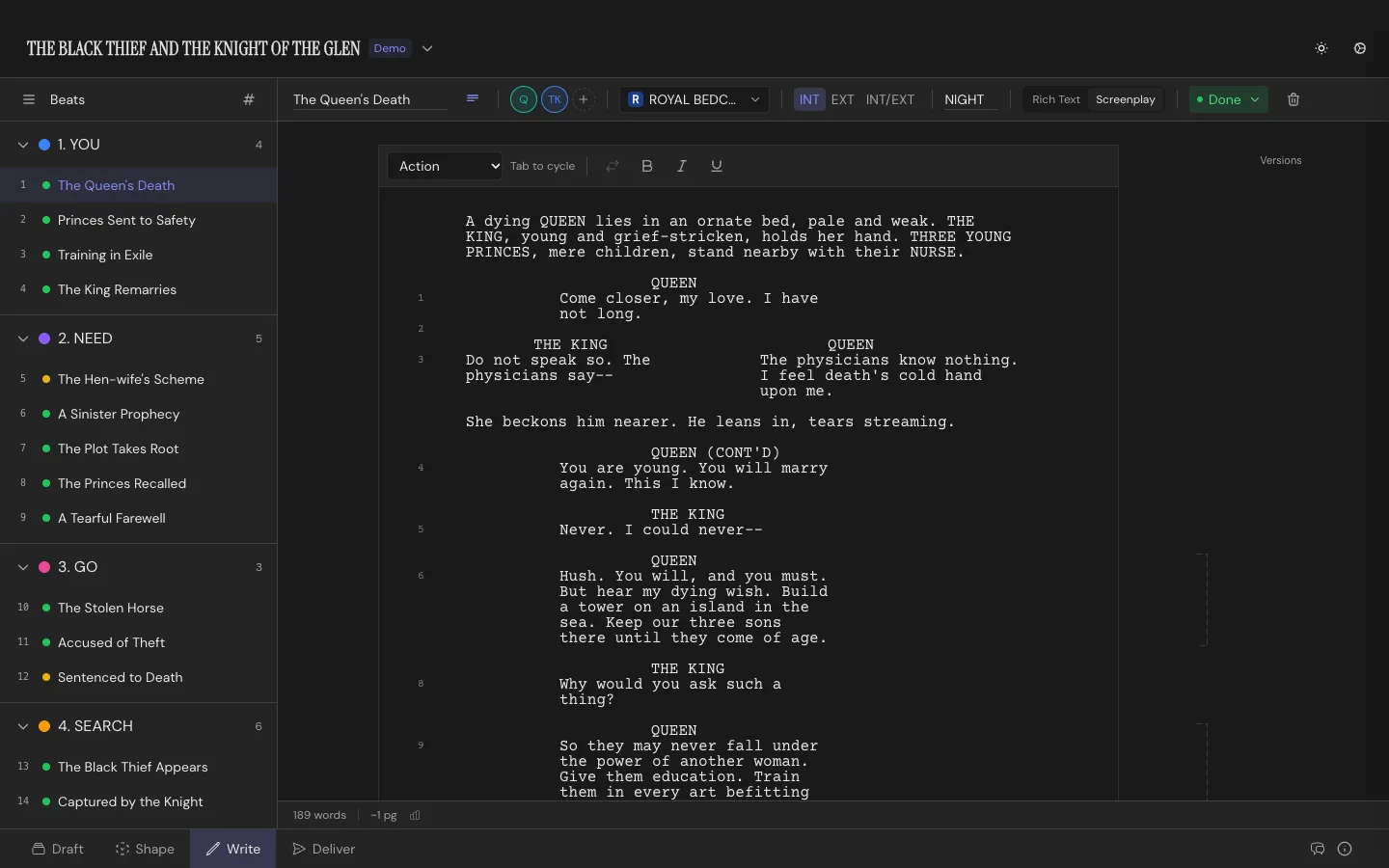
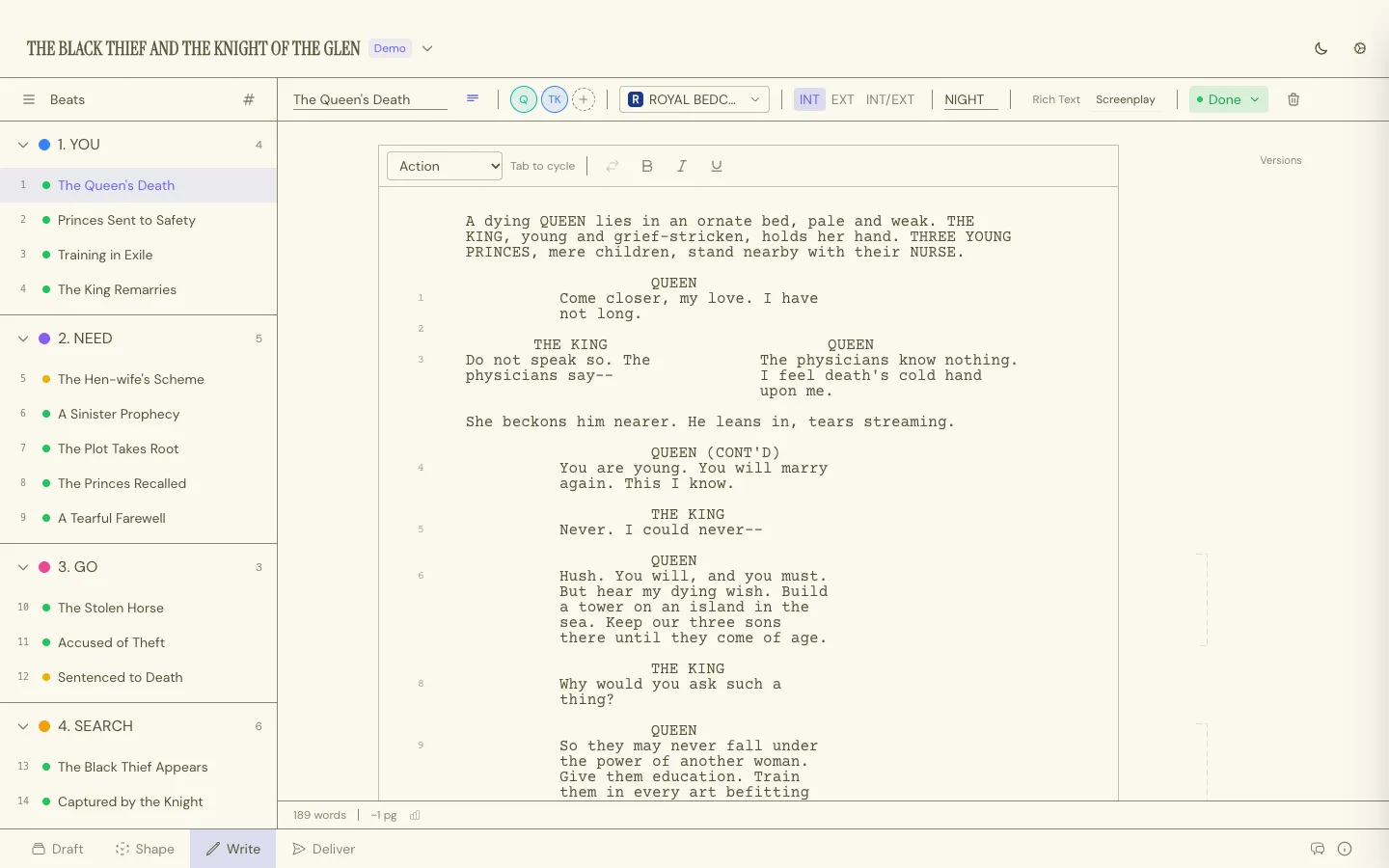
The outline in the Write Workspace is story order: the headings are Structure Cards, the rows are the Beats stacked on them, and the number beside each row is its Beat number.
Always read Beats through storyOrder, never by sorting on sequence. Stacked Beats all have sequence: -1 and get their place from the card they’re stacked on, so a sort scrambles them. The story order rule explains how storyOrder is built.
The Beat number in guide.beatNumbers is the number the writer sees next to each Beat, counting from 1. Use it (with the title) whenever your software talks to a writer about a Beat. beat.sceneNumber is something else: the scene number the writer prints in the screenplay, such as "42A". It’s often missing and doesn’t have to be unique or in order.
A Beat’s cast is in beat.chips, one { "type": "character", "id" } entry per Character. Its one Setting is beat.sleeveId, an id from worlds, or null.
Read the script
Section titled “Read the script”The script lives in beat.contentJson, a TipTap JSON document. beat.content is a plain-text copy without element types, good for search and previews and nothing else.
The document is a list of blocks, and each block contains text nodes (plus hardBreak nodes for line breaks):
| Block | Meaning |
|---|---|
action | Action or description. |
character | A character cue. attrs.dual: true means the speech runs at the same time as the one before it (dual dialogue). |
dialogue | Speech. Several dialogue blocks after one cue are one speech with paragraph breaks. |
parenthetical | A parenthetical, stored without its parentheses. |
transition | A transition, such as CUT TO:. |
paragraph | Used by rich text projects. attrs.screenplayType contains one of the element types above, or nothing for plain prose. |
versionBlock | Alternate drafts of a passage. Its children are the active version, and attrs.versions contains the alternates. |
Cues and transitions are stored in capital letters. The scene heading isn’t part of the script: Throughline builds it from beat.intExt, the Setting’s title and beat.timeOfDay, as in INT. ROYAL BEDCHAMBER - NIGHT.
#!/usr/bin/env python3"""Print one Beat's script. Usage: print_script.py story.thrl BEAT_NUMBER"""import sys
from list_beats import load_thrl
INDENT = {"character": 20, "parenthetical": 15, "dialogue": 10, "transition": 40}

def script_blocks(node):    """Yield (element, text) for each block of the readable script."""    for block in node.get("content", []):        element = block.get("type")        if element == "versionBlock":            yield from script_blocks(block)  # its children are the active version            continue        if element == "paragraph":  # rich text projects            element = (block.get("attrs") or {}).get("screenplayType") or "paragraph"        text = "".join(            "\n" if child["type"] == "hardBreak" else child.get("text", "")            for child in block.get("content", [])            if child.get("type") in ("text", "hardBreak")        )        yield element, text

def main(path, beat_number):    doc = load_thrl(path)    beats = {b["id"]: b for b in doc["beats"]}    beat = beats[doc["storyOrder"][beat_number - 1]]    for element, text in script_blocks(beat.get("contentJson") or {}):        if element == "parenthetical":            text = f"({text})"  # stored without parentheses        print(" " * INDENT.get(element, 0) + text)

if __name__ == "__main__":    main(sys.argv[1], int(sys.argv[2]))
Relationships at a Beat
Section titled “Relationships at a Beat”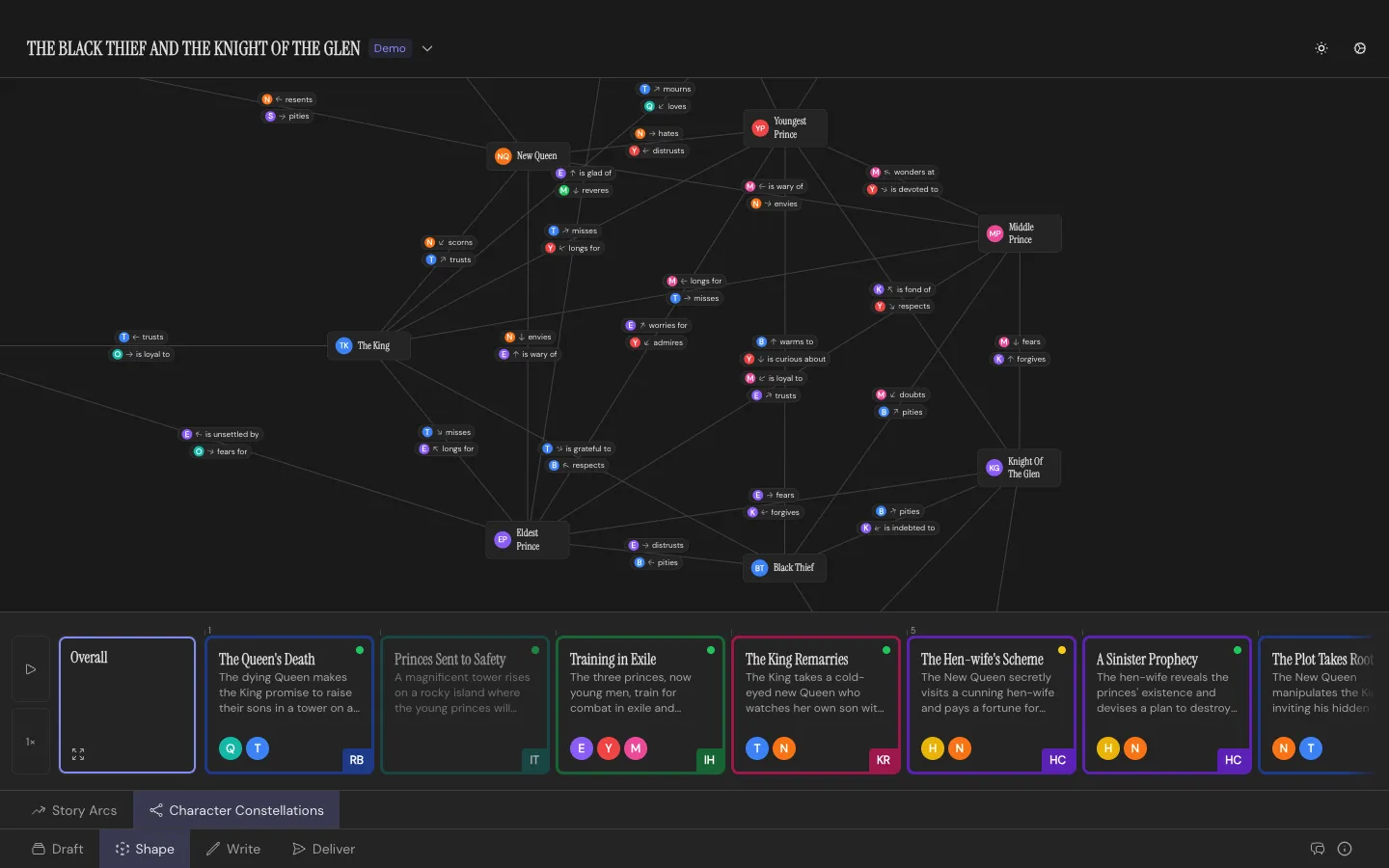

Each line on the Constellation is one relationship, labeled with how each Character feels about the other: aToB is how aId feels about bId, and bToA the other way around.
Those feelings change during the story, so a relationship carries overrides, each tied to a Beat. To read a relationship at a Beat, resolve aToB, bToA and dissolved one by one: each takes the value of the latest override at or before that Beat, or its base value if there isn’t one. A relationship with a startBeatId doesn’t exist before that Beat. Character positions on the Constellation work the same way, through constellation.overrides.
#!/usr/bin/env python3"""Print the relationships at one Beat. Usage: relationships_at.py story.thrl BEAT_NUMBER"""import sys
from list_beats import load_thrl

def relationship_at(rel, beat_index, at):    """Resolve one relationship at story index `at` (0 is the first Beat)."""    state = {"aToB": rel.get("aToB", ""), "bToA": rel.get("bToA", ""), "dissolved": False}    found_at = {}    for override in rel.get("overrides", []):        index = beat_index.get(override["beatId"])        if index is None or index > at:            continue  # an unknown Beat, or a later one        for field in ("aToB", "bToA", "dissolved"):            if field in override and index >= found_at.get(field, -1):                state[field] = override[field]                found_at[field] = index    start = beat_index.get(rel.get("startBeatId"))    if "dissolved" not in found_at and start is not None and start > at:        state["dissolved"] = True  # it doesn't exist yet    return state

def main(path, beat_number):    doc = load_thrl(path)    beat_index = {beat_id: i for i, beat_id in enumerate(doc["storyOrder"])}    names = {c["id"]: c["name"] for c in doc["characters"]}    for rel in doc.get("relationships", []):        state = relationship_at(rel, beat_index, beat_number - 1)        if state["dissolved"]:            continue        a, b = names[rel["aId"]], names[rel["bId"]]        if state["aToB"]:            print(f"{a} {state['aToB']} {b}")        if state["bToA"]:            print(f"{b} {state['bToA']} {a}")

if __name__ == "__main__":    main(sys.argv[1], int(sys.argv[2]))
In the demo project, the New Queen “tolerates” the King at Beat 4 and “disdains” him by Beat 12.
Arcs and charge
Section titled “Arcs and charge”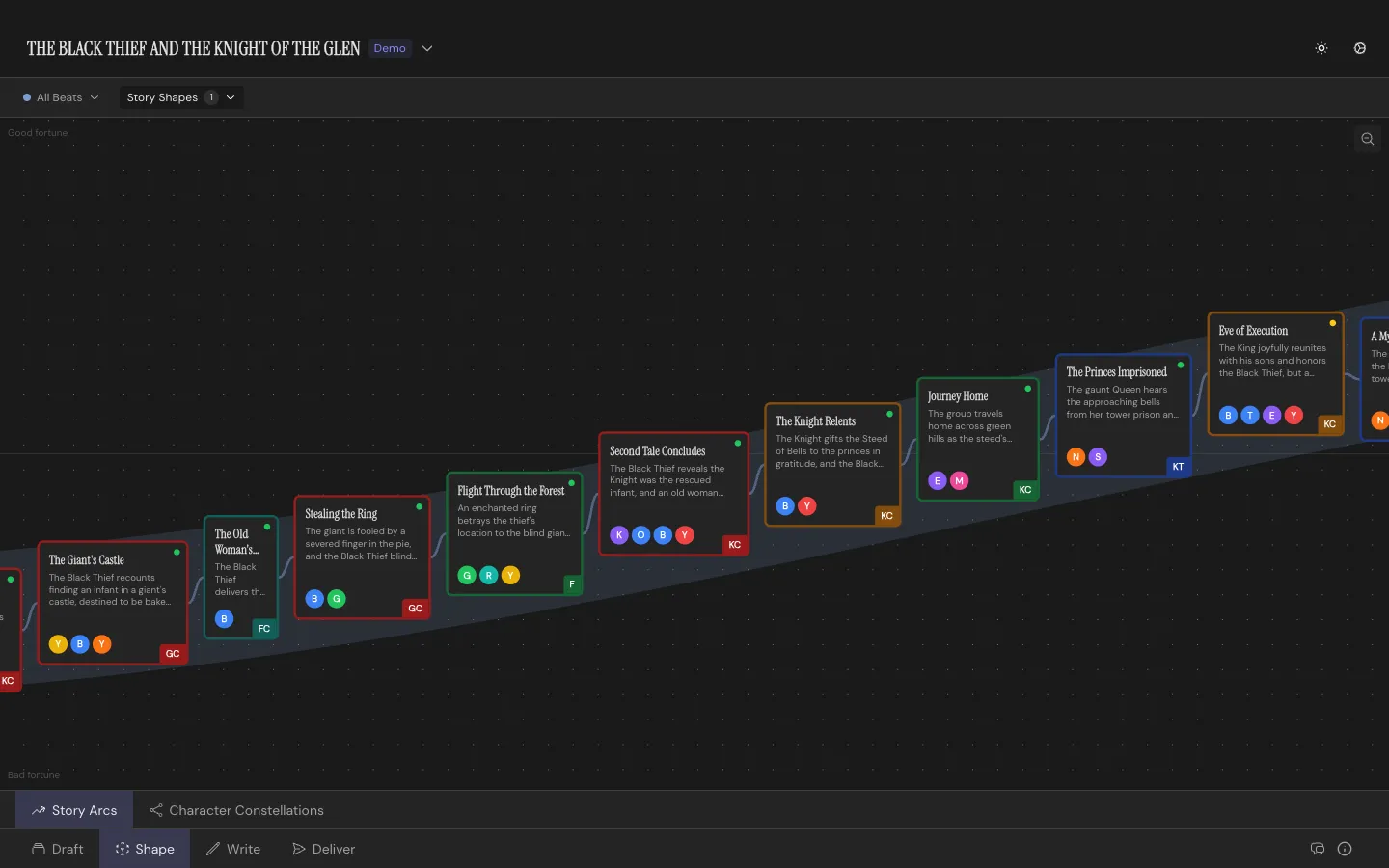
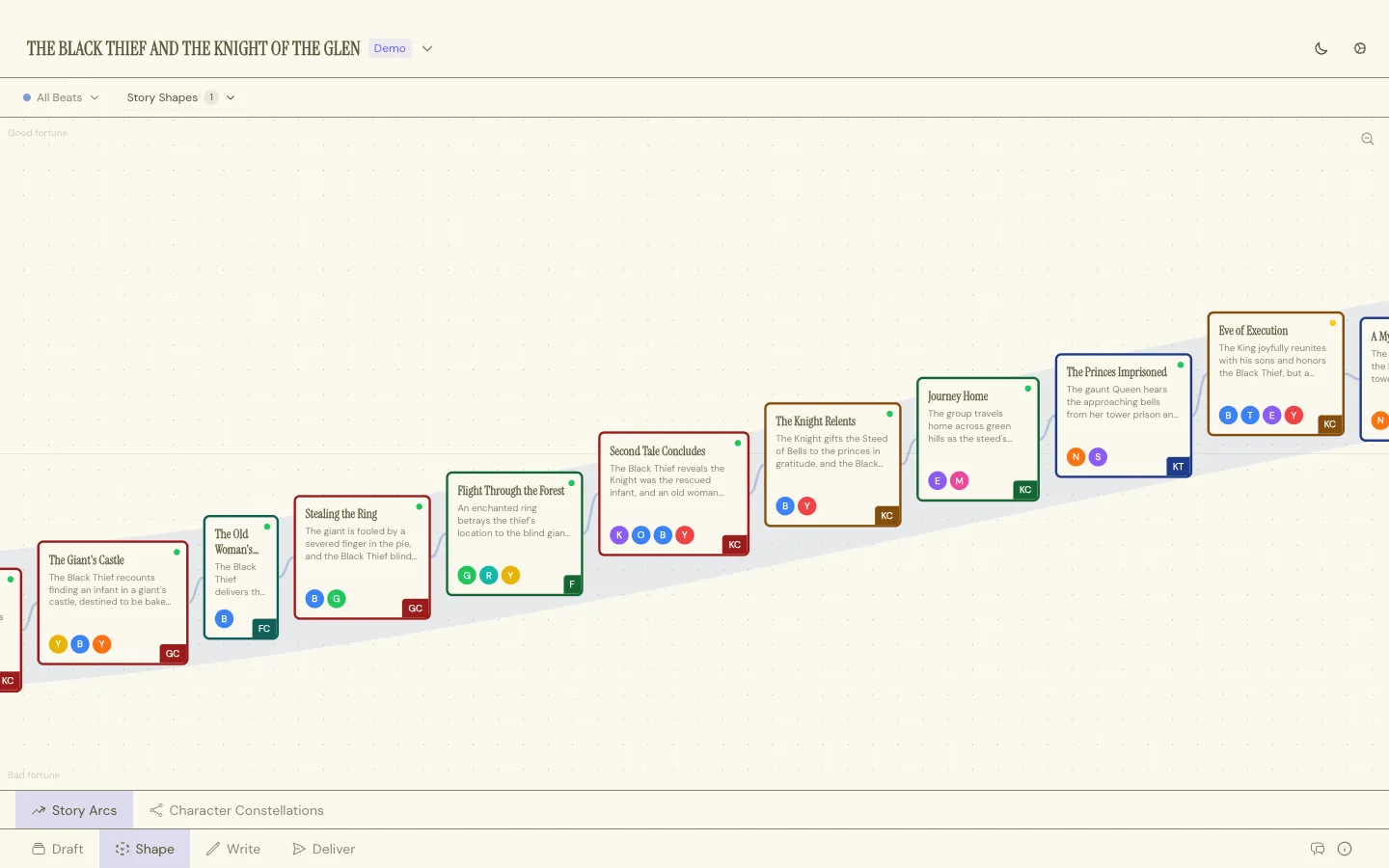
An Arc is one plotline between two poles the writer names. Each Beat card sits at its charge, from -1 (negPole, at the bottom) to +1 (posPole, at the top). The pale band behind them is a Story Shape from arc.shapeIds.
arc.beatIds lists the Arc’s Beats, except on the default Arc (isDefault: true), which contains every Beat. The charges are in arc.points, one { "beatId", "charge" } entry per Beat, and a member without an entry sits at 0. Throughline leaves Beats with the status "no-print" off every Arc. Empty pole names mean “good fortune” and “bad fortune”.
#!/usr/bin/env python3"""Print each Arc's charge at each of its Beats. Usage: arc_charges.py story.thrl"""import sys
from list_beats import load_thrl

def main(path):    doc = load_thrl(path)    beats = {b["id"]: b for b in doc["beats"]}    for arc in doc.get("arcs", []):        members = None if arc.get("isDefault") else set(arc.get("beatIds", []))        charges = {p["beatId"]: p.get("charge", 0) for p in arc.get("points", [])}        name = arc.get("name") or ("Fortune" if arc.get("isDefault") else "Unnamed")        print(f"{name}: -1 = {arc.get('negPole') or 'bad fortune'}, +1 = {arc.get('posPole') or 'good fortune'}")        for beat_id in doc["storyOrder"]:            if (members is None or beat_id in members) and beats[beat_id].get("status") != "no-print":                print(f"  {charges.get(beat_id, 0):+.2f}  {beats[beat_id]['title']}")

if __name__ == "__main__":    main(sys.argv[1])
The recycling bin
Section titled “The recycling bin”recycledItems contains the cards the writer deleted. They aren’t part of the story, so leave them out of story order, Beat numbers, casts and counts.