Write
The Write Workspace is where the actual text gets written.
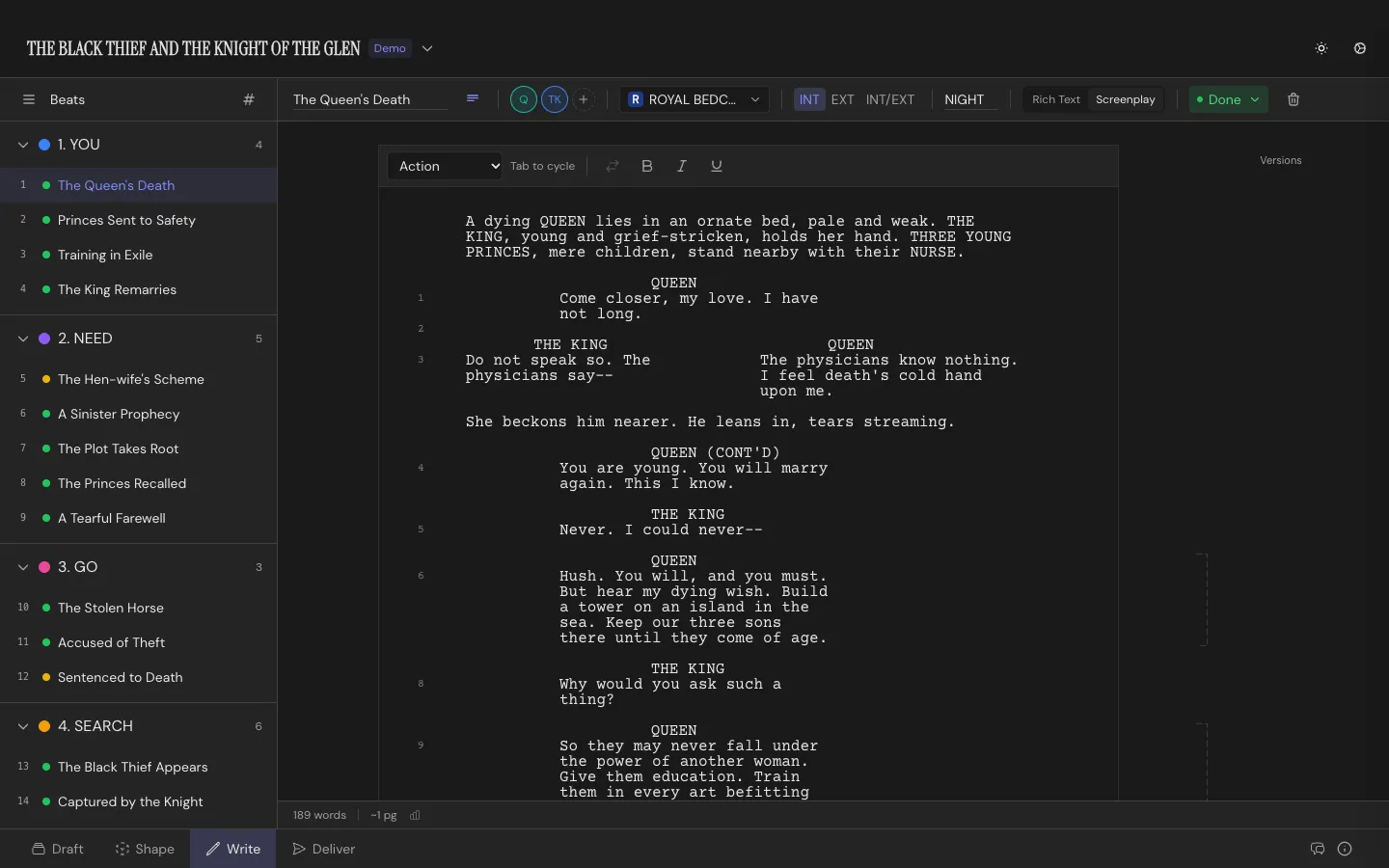
Two modes, one document
Section titled “Two modes, one document”Every project has a Rich Text mode and a Screenplay mode, toggled per project. Rich Text gets you bold, italic, and underline for prose. Screenplay mode gets you scene headings, action lines, character cues, dialogue, parentheticals, and transition elements, with Tab cycling between them as you type.
Scene headings build from INT/EXT plus a location and a time of day. Character names autocomplete from your project’s cast, and (V.O.) and (O.S.) cues stay linked to whichever Character they belong to. Scenes and dialogue can auto-number. See Formatting & Elements for the full element reference.
The Beat sidebar
Section titled “The Beat sidebar”A list of every Beat in the project, grouped under whatever Structure Card they’re stacked on. Click one to open it in the main editor, or add a new Beat right from the sidebar without leaving the Write Workspace.
Each row starts with a number. By default it’s the Beat’s place in story order, counted straight through from the first Beat to the last, across every Structure Card. It follows the story: move a Beat and the numbers update. AI apps you connect to Throughline use the same numbers, so “Beat 12” means the same Beat to you and to them.
Once you number your scenes, a Beat with a scene number shows that number in the row instead. Scene numbers stay fixed when you reorder, so after a move they can differ from the story order. See Numbering.
Hover a row and its number turns into a drag handle. Drag it to move the Beat in the story. To change a scene number by hand, click the handle and type the new one.
The taskbar
Section titled “The taskbar”Sits above the page for whichever Beat you’re on: title, Characters, Setting, INT/EXT and time of day, status, a short summary for the card back in Draft, and color. Create a new Character or Setting inline from here if the one you need doesn’t exist yet.
Versions
Section titled “Versions”Torn between two takes on a scene? Version it. Duplicate branches a new version from the current one; Start Fresh begins blank. Switch between versions, compare two side by side, or delete one you’ve decided against. Only the active version of a Beat is counted in scene and dialogue numbering. See Scene Versions.
Renaming a Character
Section titled “Renaming a Character”Rename a Character anywhere in Throughline and the Write Workspace offers to rename them everywhere they appear in the script too, cues and prose mentions both, with a preview of how many scenes and lines are affected before you commit.